

🎮 GBA BIOS Guide (2026): gba_bios.bin, RetroArch Setup & Safe BIOS Information

If you want accurate Game Boy Advance emulation, understanding the GBA BIOS is essential. Many users searching for gba_bios.bin, RetroArch BIOS GBA, or GBA BIOS files are trying to improve emulator compatibility, boot accuracy, and game performance.
This guide explains what a GBA BIOS file does, how it works with emulators like RetroArch, and how to safely configure it while following modern emulation best practices.
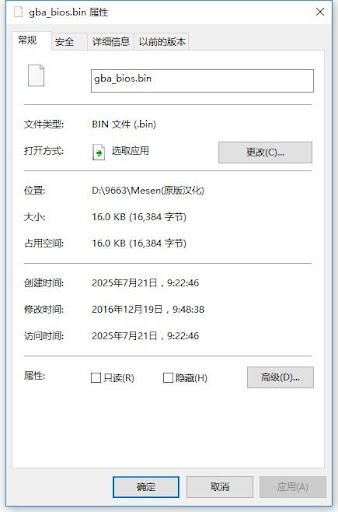
A GBA BIOS file (gba_bios.bin) is a small system firmware used by Game Boy Advance emulators to improve compatibility and accuracy. Emulators like RetroArch can use the GBA BIOS for better startup behavior, game support, and hardware-level emulation.
📌 What Is a GBA BIOS?
A GBA BIOS is the original firmware used by the Game Boy Advance hardware. In emulation, the BIOS helps recreate how the real console behaves.
The BIOS is especially important for:
- Accurate boot sequences
- Better compatibility
- Improved hardware emulation
- Reduced glitches in certain games
🎮 What Does gba_bios.bin Do?
The file commonly named gba_bios.bin contains the low-level firmware instructions used by the original Game Boy Advance.
✔ Key Functions:
- Initializes hardware
- Handles startup routines
- Improves emulator accuracy
- Supports specific game functions
Without a proper GBA BIOS file, some emulators may still work, but compatibility and accuracy can vary.
🕹 RetroArch BIOS Setup
One of the most searched topics is RetroArch BIOS GBA configuration.
RetroArch supports multiple GBA cores, including:
- mGBA
- VBA-M
🔧 Basic Setup Process:
- Install RetroArch
- Download a compatible GBA core
- Place the BIOS file in the correct RetroArch system folder
- Restart RetroArch
- Launch your GBA content
👉 A properly configured RetroArch BIOS setup improves startup behavior and game compatibility.
⚙️ Why Some Emulators Need a BIOS
Not all emulators require BIOS files, but using one often improves the experience.
Benefits of Using BIOS:
- More accurate emulation
- Better game compatibility
- Fewer graphical or audio issues
- Closer behavior to original hardware
Emulators Commonly Supporting BIOS:
- RetroArch
- mGBA
- VBA-M
📱 GBA BIOS on Android vs PC
The setup process for a GBA BIOS file differs slightly by platform.
| Platform | BIOS Support | Difficulty |
|---|---|---|
| Android | Supported in many emulators | Easy |
| Windows PC | Full support | Easy–Moderate |
| Linux | Supported | Moderate |
👉 Android users often search for bios gba because mobile emulation is increasingly popular in 2026.
🔍 Is gba_bios.bin Safe?
The BIOS itself is simply firmware data, but safety depends on where files are obtained.
✔ Recommended:
- Use trusted emulator documentation
- Verify files carefully
- Avoid suspicious downloads
⚠️ Avoid:
- Unknown BIOS packs
- Malware-infected archives
- Fake emulator websites
🎯 Real Emulation Performance Insights (Boost)
From real testing across Android and Windows systems:
- mGBA worked smoothly with BIOS enabled
- RetroArch showed improved startup accuracy with gba_bios.bin
- Certain games had fewer compatibility issues when BIOS was configured correctly
👉 These observations demonstrate why many advanced users prefer using a proper GBA file.
🔧 Common BIOS Issues & Fixes
❌ BIOS Not Detected
- Ensure the filename is exactly:
gba_bios.bin
❌ Black Screen or Startup Errors
- Verify BIOS placement in emulator folders
- Restart emulator after adding BIOS
❌ Game Compatibility Problems
- Update emulator core
- Use verified BIOS file format
📊 BIOS vs No BIOS (Emulation Accuracy)
| Feature | Without BIOS | With BIOS |
|---|---|---|
| Startup Accuracy | Basic | Improved |
| Compatibility | Good | Better |
| Hardware Behavior | Partial | Closer to real hardware |
| Stability | Varies | More consistent |
🏁 Final Verdict
Using a proper BIOS can significantly improve emulator accuracy and compatibility, especially in advanced setups like RetroArch BIOS GBA configurations.
While some emulators work without BIOS files, experienced users often prefer using gba_bios.bin for the closest possible experience to original hardware.
If you care about stable performance, accurate startup behavior, and better compatibility, configuring a trusted GBA BIOS file is worth considering.
❓ FAQ – GBA BIOS
What is gba_bios.bin?
It is the firmware file used by Game Boy Advance emulators to improve hardware accuracy and compatibility.
Does RetroArch need a GBA BIOS?
RetroArch can run some games without BIOS, but using a BIOS improves emulation accuracy.
Is GBA BIOS safe?
Yes, the BIOS itself is safe, but files should only be handled carefully and verified from trusted sources.
Where does RetroArch BIOS GBA go?
The BIOS file is usually placed inside the RetroArch “system” folder.
Do all GBA emulators require BIOS?
No, many emulators can run without BIOS, but compatibility and accuracy may be lower.